
Every Dressmaker term mapped to the screen it lives on: grain, cut out, seam line, mannequin, sketchbook, commission card, coin, rank and off-the-rack.
Dressmaker Tutorial: The Words That Actually Change Your Score
A first commission in Dressmaker takes about fifteen minutes once you know which screen each sewing term lives on, and about an hour if you do not. Everything that matters is visible in two panels: the commission card lists requirements as target numbers (one in-game brief reads Quality 70, Flowers 60, Cute 30, Romantic 45), and the finishing panel scores you as actual-over-target, where the same axes read Cute 206/25 and Patterned 183/25. That gap is decided in three places: the ON GRAIN tag on each pattern piece, the shears on the cutting table, and the dotted seam line in the sewing scene.
- No fabric physics to learn. Cozy Lives states plainly that the game runs no cloth simulation, and ironing was deliberately left out.
- You never lose a commission to a bad decision. Un-cut fabric returns to the bolt, and Seam Rip undoes a stitch.
- Fabric costs coin. A sampled shop panel lists cloths between 2.00 and 6.00, against a first-commission budget of 800.
- Two currencies, not one. Coin buys cloth; Rank unlocks it.
The Order Of Operations On Your First Commission
The loop never varies, and the game will not let you skip a stage.
- Ring the bell. Patch Build 403 made this explicit: you now ring the bell to summon the next customer. The customer walks in and their brief pins itself to your sketchbook.
- Take the measurements. The mannequin rescales to the client, and the same numbers drive the 2D pattern pieces, so a mis-set mannequin distorts the panels you are about to cut.
- Draft in the sketchbook. Bodice, collar, sleeve and skirt are picked with arrow buttons. The page prints an estimate before you spend anything, in the form Approx. 4.73m fabric required, and you press Draft Pattern.
- Buy fabric. The Fabrics panel lists cloths with a per-metre price. Preview tags by adding a swatch to the sketchbook.
- Cut on the cutting table. Drag pieces from the Patterns panel onto the bolt, respect the grain tag, cut with the shears.
- Sew. Feed each panel through the machine and hold the seam.
- Dress the mannequin. Switch to the Accessories tab, place trims, press Finish.
- Close it out. The Sewing Complete dialog offers Complete Commission, Continue Working, Sell dress, or Gift Dress.
Official source: Dressmaker on Steam lists the same chain in its own feature list: buy fabric, arrange and cut out patterns, preview them on a mannequin, sew them together, then turn in dresses for reputation and coin.
Vocabulary: What Each Term Means On Screen
Most confusion here comes from words that mean something different than they do in a real sewing room. These are the thirteen that matter, and the set is not arbitrary: counting the 100 most recent English Steam reviews, 21 mention sewing, 17 fabric, 8 patterns, 5 clients, 4 money and 3 buttons. That is how players actually describe the game.
| Term you will hear | What it is in Dressmaker |
|---|---|
| Grain | A tag printed on the pattern piece, reading ON GRAIN. Rotate the piece until it runs along the fabric's warp, the direction of the thread in the woven cloth. |
| Bias | The diagonal. Curved skirt pieces want it, and forcing one onto the grain wastes metres you paid for. |
| Pattern piece | A flat paper shape in the Patterns panel, what the store page calls a pattern you arrange and cut out. |
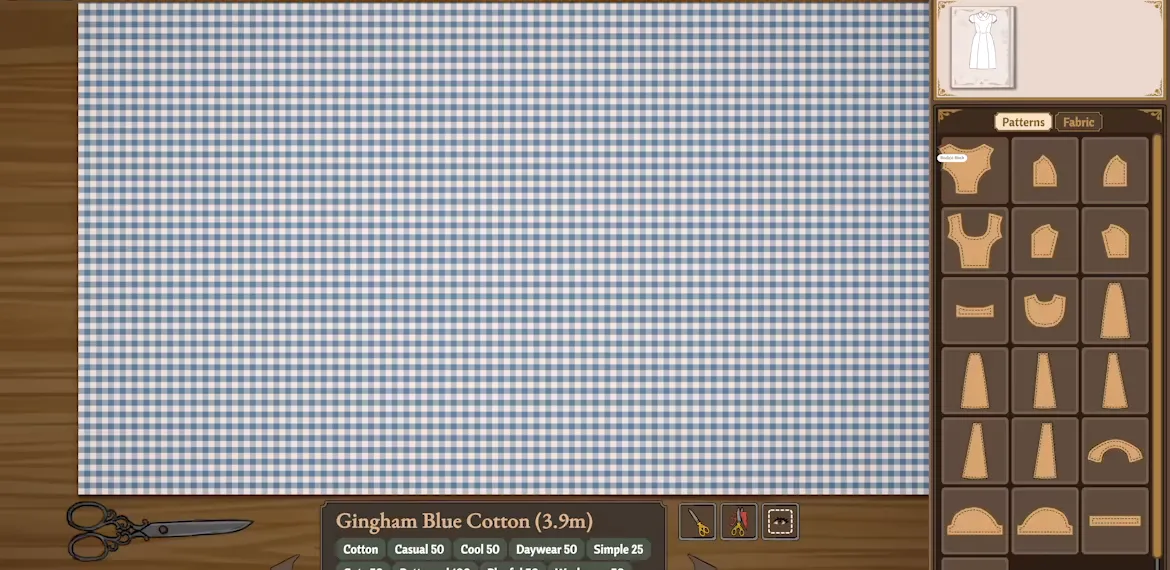
| Cut out | Drag the piece onto the bolt, rotate it, then use the shears. There is no separate cut command. |
| Seam / stitch line | The dotted line on the panel you follow while sewing. Drift off it and quality drops in real time. |
| Seam Rip | The button at the bottom right of the sewing screen. Your undo for a bad line. |
| Mannequin | The dress form, sized to the client's measurements, where fabric, appliques and trims are placed. |
| Sketchbook | The design board. Assemble and colour the garment, pin fabric swatches, then draft the pattern. |
| Commission card | The brief: client dialogue, a coin budget, and a Requirements list of target attribute values. |
| Tag | The property printed under a fabric's name. Gingham Blue Cotton reads Cotton, Casual 50, Cool 50, Daywear 50, Simple 25. |
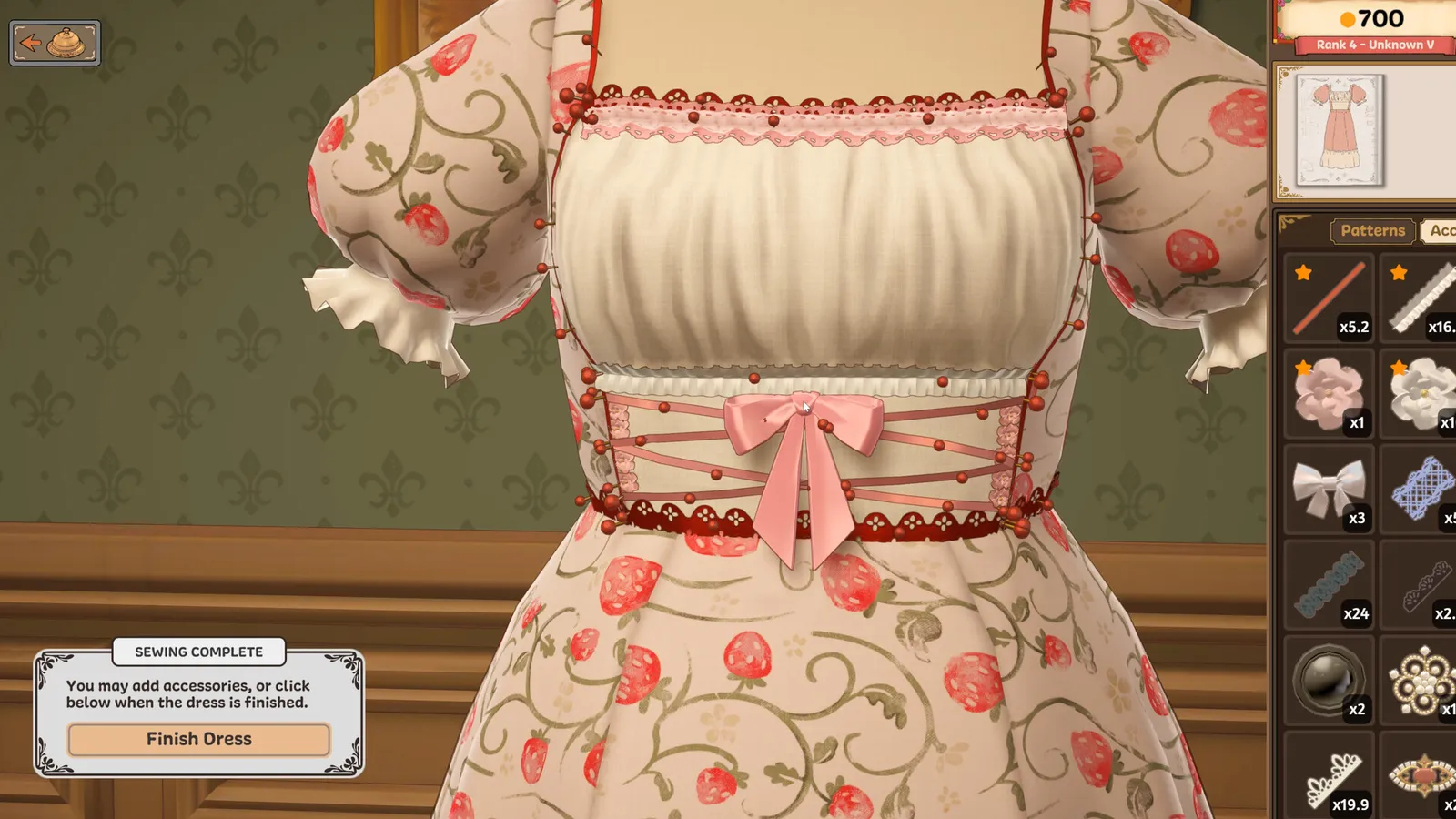
| Coin | The top-right balance, seen at 558 and 700 in two captured sessions. Buys fabric, trims, accessories. |
| Rank | Your reputation track, shown as Rank 0 - Unknown and later Rank 4 - Unknown V. Unlocks patterns, fabrics, story. |
| Shop window / off the rack | The second till. Finish a dress with no brief and sell it to whoever walks in. |
Grain, Cut Out, And The Seam Line
These three are the whole quality game, and all three are legible before you commit anything.
Grain is a tag, not a vibe. The pieces in the cutting panel carry a printed ON GRAIN label, and the bolt has a direction the piece must agree with. The Guardian's feature glosses the term as the developers meant it: the grain line is the direction of the thread. Break the agreement and the fabric will still let you cut it, which is the trap. One player reports only being able to use gradient fabric by ignoring the pattern bias, so a violation is permitted and charged for downstream.
Cut out is a drag, a rotate, and a snip. The cursor becomes the shears. The pattern panel sits right of the cutting table with a grid toggle, and the fabric card along the bottom shows how much length is left. Cut greedily and you run the bolt out mid-skirt.
The seam line is a live accuracy meter. You are not picking from a menu of correct answers, you are dragging fabric through a machine and staying on a dotted path. Deviating does not fail the commission, it quietly costs you. Players report sitting at 99 percent quality for most of a run.
Sewing assistance is an accessibility option, and players call it the best feature in the game. The machine is the only minigame where failure is silent, so decide on day one whether you want the challenge or the clean line.
The Two Tills: Coin And Rank
Coin and reputation are separate and do not substitute for each other.
Coin is the number in the top-right corner. It pays for the fabric list, where one sampled shop panel reads Charcoal Grey Cotton 3.00, Cool Grey Linen 3.00, Dusty Pink Silk 4.00, Bridget Silk Brocade 6.00 and Paisley Plum Silk Brocade 2.00, against a first brief's 800 budget. Whatever unit those figures carry, the ratio is the point: cloth is priced well under the commission, so running short means you bought badly, not that the game is stingy.
Rank is the ribbon under the coin balance, and it matters long-term: it gates new patterns, new fabrics and the story. Run short on coin early and the honest read is usually that you overbought fabric.
Off the rack is the third option at the finish dialog. A commission dress ends with Complete Commission; a dress you built for yourself ends with Sell dress, and the button shows the coin before you click it, which is the cleanest way to price-test a design without burning a client's patience.
Accessories And Trims: Zoom, Red Pins, And Rotation
This is where new players lose an hour, and almost all of it is two controls nobody explains.
Zoom is on Z, or a click of the mouse wheel. Scrolling the wheel spins the dress form instead. Players fought this for a day after launch, and the Steam thread on lining up accessories is where the answer landed: the wheel has to be pressed, twice for the closer zoom. Z works too, and the control pad above the mannequin has magnifier buttons as a third route.
Red pins are the handles. Every placed accessory is held by a row of red pins along its edge. Enter the Accessories tab, hover a pin, click, and the pin itself can be dragged, which is how you bend a length of lace into a curve instead of leaving it straight. Tilting and resizing the trim changes more than you would expect.
Several players report the parallax scrolling during sewing, and while pieces do not fit, as migraine-inducing; one review says the game triggered photosensitive epilepsy and migraines, and no broad accessibility options are listed at launch. Separately, resizing the mannequin is described as far too sensitive with no way to rebind it. If either lands badly on you, it is a known problem, not a misclick.
Ironing is the most-requested missing feature and the developers have said so. They also confirmed there is no cloth simulation, which is why you can paint a dress with trims in ways no real garment would allow. The full feature list is on the publisher's Dressmaker page.
Your First Hour, Spent Deliberately
Spend ten minutes on the sketchbook alone. Swap bodices, sleeves and skirts, watch the Approx. X m fabric required number move, and preview tags with swatches. You learn what the commission is asking for before coin is involved.
Then cut one dress badly on purpose. Ignore the ON GRAIN tag, cut the skirt tight, sew off the line, and fix all three with un-cut, Seam Rip and a re-draft. Nothing is permanent, and every recovery tool shows up in the first hour.
Only then optimise. The quality guide covers the requirement and score panels, the characters guide the customers driving the story, and the Mac guide the Apple Silicon build.
FAQ
I do not see a finish dress button like with the commissions. Everything seems to be sewed. How do I sell off-the-rack dresses? That is the intended difference. With a brief attached the last option is Complete Commission; without one, the Sewing Complete dialog offers Sell dress with a coin figure on the button, plus Gift Dress. If neither appears, players report that rotating the model too fast stops the prompt from coming up, and that letting the pinning finish without rotating brings it back.
I cannot get the zoom to work. When I use the scroll wheel it just rotates the dress form. Scroll rotates the form, by design. Press the wheel rather than rolling it, twice for the closer view, or use Z.
How do I line up accessories so they are all inline and look nice? There is no auto-align. Pin aggressively: every time a lace or trim lifts or drifts, add a pin, then drag that pin to reshape the run. Where you pin matters as much as how many, because the pins hold the trim against the body.
Does a commission want a heavy drape jersey with double lining, and do I need a natural fibre? No. The game does not model drape, lining or fibre chemistry, and no fabric in the shop is disqualified on those grounds. A commission checks the attribute tags on your fabric, trims and colour scheme against the numbers on the requirements list.
The parallax scrolling when pieces do not fit is really migraine-inducing. Is there a way to turn it down? Players report it as recurring, and no broad accessibility options are listed at launch. Take breaks, and watch the Out Now post on the game's news feed, which puts proper controller support on the roadmap next to transparent fabrics and an online challenge mode.
I clicked the wrong thing and lost a client's measurements. Is my save bricked? It is a real bug report, and the player who hit it restarted to recover. Avoid creating the state: do not open the sketchbook before the customer rings the bell. Cozy Lives patched a tutorial softlock caused by exactly that in Build 410.
Related Guides
- Dressmaker Quality Guide - how requirement targets, tag values and the actual-over-target panel turn into a finished grade.
- Dressmaker Steam Guide - price, system requirements, the Build 403 and 410 patch contents, and the announced roadmap.
- Dressmaker Characters Guide - the customers whose commissions drive the story, and what each tends to ask for.
- Dressmaker on Mac - running the game on Apple Silicon and what changes for the mannequin controls.