Zoom in Dressmaker with the Z key or a middle mouse click. Why the wheel rotates instead, plus fixes for stuck zoom and Steam Deck mapping.
How to Zoom In Dressmaker: Camera, Controls, and Why It Breaks
Zoom in Dressmaker with the Z key or by pressing the middle mouse button. Rolling the scroll wheel does not zoom at all, it rotates the dress form, which is why so many players think the zoom is missing. The zoom is a fixed three-step cycle rather than a slider: one press steps the camera in, a second steps it closer, and a third returns you to the normal view. On Steam Deck there is no working default, because the zoom lives on a middle mouse click that Deck owners have to map themselves. And there is no verified UI scale slider in the Options menu.
- Two zoom inputs only: Z and middle mouse click, confirmed across three independent reports
- Press the wheel to zoom, roll it to rotate; the third press wraps back to normal
- Steam Deck has no zoom binding at all, so remap middle mouse click or Z yourself
- No confirmed UI scale setting; the documented options are Sewing Assist and accessory rotation
The two inputs and the three zoom states
The camera list is short because there is no zoom slider and no modifier combination. Two inputs do the zoom, and everything else moves or turns what you have zoomed into.
| Input | What it actually does | Evidence |
|---|---|---|
| Z key | Steps the camera in one level, closer on the second press, back to normal on the third | Binding confirmed; three-state cycle community-observed |
| Middle mouse click | The same zoom action as Z | Confirmed across three independent reports |
| Scroll wheel, rolled | Rotates the dress form | Confirmed |
| Scroll wheel, pressed | Zooms in; press twice to go closer | Community-observed |
| Click and drag | Rotates the mannequin | Community-observed |
| A and D | Pans the view, but only while you are zoomed out | Community-observed |
| Scroll wheel while zoomed in holding an accessory | Rotates the accessory angle instead | Community-observed |
The cleanest description of the zoom states comes from a player in the accessories thread on Steam, posted the day the game launched: "Z is a zoom key. for me it zooms once when you click z, then it zooms closer, then reverts back to normal view." That is a cycle, not a maximum: a player who zooms twice, sees no change and assumes a hard limit has usually not made the third press.
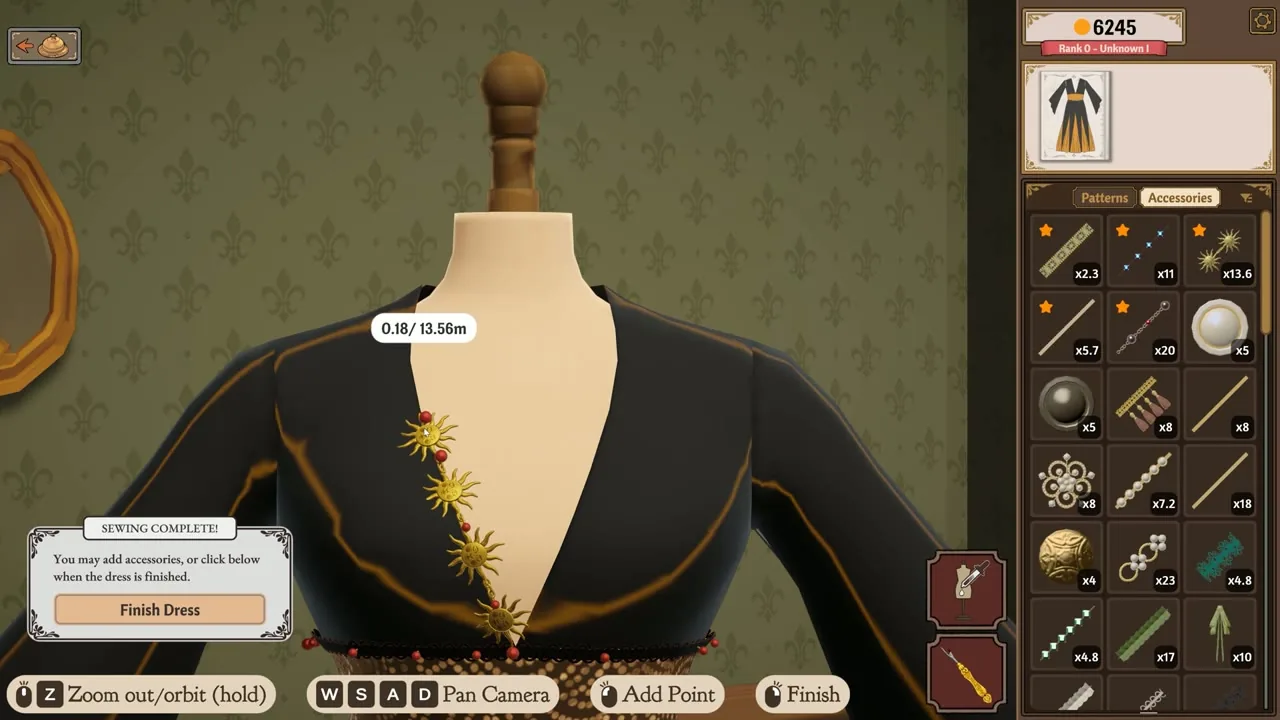
Community-observed; it may change with game updates. The cycle comes from players rather than the developers, and no official source describes the zoom states at all.
Why the scroll wheel looks broken
One physical control does two different things depending on how you move it. Rolling it turns the dress form. Pressing it, without rolling, zooms. Both answers come from the same launch-day thread. One player wrote: "I can't get the zoom to work for me. When I use the scroll wheel it just rotates the dress form." The reply that resolved it was short: "Yes, you have to press on the wheel for it to work. Twice to zoom even more."
A and D adds a second layer. A player working out their own controls described the state-dependent behaviour: "zoomed out, so a and d isnt panning its rotating. i try a and d, i try the scroll wheel, i try clicking and dragging, and technically these all work." A and D pan only while zoomed out, so pressing them after zooming in on a seam does nothing, which again reads as a dead control.
Official source: Dressmaker on Steam and the Build 410 patch notes of September 24, 2026, which changed how the wheel behaves in the cutting room. Before that patch, hovering the inventory and rolling the wheel spun the pattern panels on the cutting table. If a video or an older guide shows the wheel hijacking your cutting panels, that is pre-Build 410 behaviour and it is fixed.
A mouse with a clickable middle button plus a keyboard gives you the whole camera. A trackpad, a Magic Mouse, or a Deck pad with no mapping gives you nothing. Check which of the two you have before deciding the zoom is broken.
Zooming on Steam Deck, Mac and AZERTY keyboards
Two setups have no working zoom out of the box, and both come from direct player reports.
Steam Deck. There is no default binding. A Deck owner writing in the Steam Deck thread put it plainly: "You need to either manually map middle mouse click or z to one of your buttons on the steam deck", and reported mapping the middle mouse click to R4 themselves. Developer Hyphenza answered that you can map whatever works for you while proper controller support is worked on. Valve rates the Deck build Playable, not Verified, and the compatibility data lists three failed checks including ControllerGlyphsDoNotMatchDeckDevice and InterfaceTextIsNotLegible.
Mac with an AZERTY keyboard and a Magic Mouse. A player opened a thread titled The zoom doesn't work, how can I manage it? with: "The Z key for zooming isn't working. I've tried all the keys on the keyboard but nothing works. I play on a Mac using an AZERTY keyboard and an Apple mouse without a scroll wheel." The thread had zero replies when last checked on September 28, 2026. The workaround circulating there is to press the key sitting in Z's physical position on your layout, since the Apple mouse removes both the middle click and the wheel press as backups. Community-observed; it may change with game updates.
| Setup | Default zoom input | Status | What to do |
|---|---|---|---|
| Windows desktop mouse and keyboard | Z and middle mouse click | Confirmed | Press the wheel for a second zoom level |
| Steam Deck | None | Confirmed absent at launch | Map middle mouse click or Z to a button |
| Mac, standard layout, Magic Mouse | Z works, no middle click | Confirmed | Use Z only, three presses to cycle |
| Mac, AZERTY layout, Magic Mouse | Neither input available to that player | Community-observed | Press the key in Z's physical position |
If your Mac trouble is the wheel or the cursor rather than the layout, the same two post-launch builds fixed the cursor disappearing in the cutting room tutorial. Details in Dressmaker on Mac and Apple Silicon.
Four zoom failures that are open right now
Two are bugs, both unacknowledged by the developers when checked on September 30, 2026.
Stuck zoomed in. A Steam reviewer wrote: "Once you zoom in, you cannot zoom out (you might have some luck if you spam click outside the mannequin until it responds)". Community-observed; it may change with game updates. The review is dated around September 28, at or just after Build 410, and no official patch has claimed to fix it.
Rotation that barely works. In the mannequin turning thread, the same player reports that "pretty much any time i try to rotate the mannequin it works less than half the time, and when it DOES work it moves it by barely a centimetre". It is filed as a rotation bug but read as a zoom bug, because the wheel is the one control that does both and the failure feels like the camera refusing to move.
AZERTY Z not registering. Covered above, single report, no developer reply.
Cutting room wheel conflict. Fixed in Build 410. If you have not updated, do that before blaming your mouse.
Recovery order when nothing responds
Work down this list rather than restarting the game.
- Press Z a third time. The cycle wraps back to the normal view, and most stuck-zoom reports stop here.
- Try the middle mouse button instead of Z. On AZERTY layouts this is the input that still works.
- Click empty shop background outside the dress form several times, the workaround named in the stuck-zoom review. Community-observed, not confirmed.
- On Steam Deck, confirm the binding actually saved. An unmapped button fails silently, which looks exactly like a broken zoom.
- If all four fail, report it on the Steam discussions for the app, quoting your input device.
Is there a UI scale setting in the Options menu
The honest answer is that one could not be found, which is not the same as confirming there is none. A pass over more than six hundred English Steam reviews returned zero mentions of ui scale, ui size, resolution or keybind, and neither the patch notes nor the launch announcement mention an interface scaling option. Treat that as a failure to locate the setting rather than proof of its absence.
The Options menu is confirmed to hold Sewing Assist, a press-Space sewing assist the developers added themselves, plus an optional accessory rotation toggle. Sewing machine speed is adjustable too. The rest of the platform picture is in Dressmaker on Steam and platform notes.
Yuumeow's Dressmaker ModLoader carries an Accessibility tab with brightness and saturation controls, a persistent sewing zoom reference line, softer reference line colours, and a switch to stop the cutting arrows flashing. Each is a capability the base game does not expose. The mod is unofficial and may break with updates.
Official source: Dressmaker on Steam lists Mouse Only Option, which is why every camera control here is a mouse or keyboard input.
FAQ
The zoom doesn't work, how can I manage it? Press Z, or press the middle mouse button. Rolling the wheel rotates the dress form instead. Pressing the wheel also zooms, and twice takes you to the closer view.
I can't get the zoom to work for me. When I use the scroll wheel it just rotates the dress form. That is the wheel doing its other job. Zoom is bound to Z and to the middle mouse click, both confirmed across three independent reports.
I zoomed in and now I cannot zoom out, what do I do? The zoom is a three-state cycle, so a third press should return you to the normal view. If nothing responds, click empty background outside the dress form several times. That workaround is a player report, not a developer fix.
The Z key for zooming isn't working. I have a Mac and an AZERTY keyboard. Two reports describe the same wall: an AZERTY layout where the labelled Z does nothing, and an Apple Magic Mouse with no scroll wheel, removing the wheel press as a backup. Try the key in Z's physical position on your layout. Community-observed, and the thread had no developer reply when last checked.
Which commissions actually need the zoom? Accessory-heavy briefs and high-scrutiny clients, where lace, trim and buttons have to sit inline on a seam. The roster and which orders pay best are in the customer and character guide, and the scoring rules are in the quality guide.
Related Guides
- Dressmaker tutorial for beginners - the measuring, cutting and sewing loop.
- Dressmaker on Mac and Apple Silicon - Gatekeeper, and why pointer travel becomes a seam accuracy problem.
- Dressmaker on Steam and platform notes - price, Deck rating, the patches and the roadmap.
- Dressmaker quality and scoring guide - how stitch accuracy and fabric tags turn a dress into a grade.