
How trim works in Dressmaker: pin-by-pin placement, why lace comes out upside down, how to remove a line, and how metres of trim count toward tag lines.
Dressmaker Trim Guide: Place, Rotate And Fix Alignment
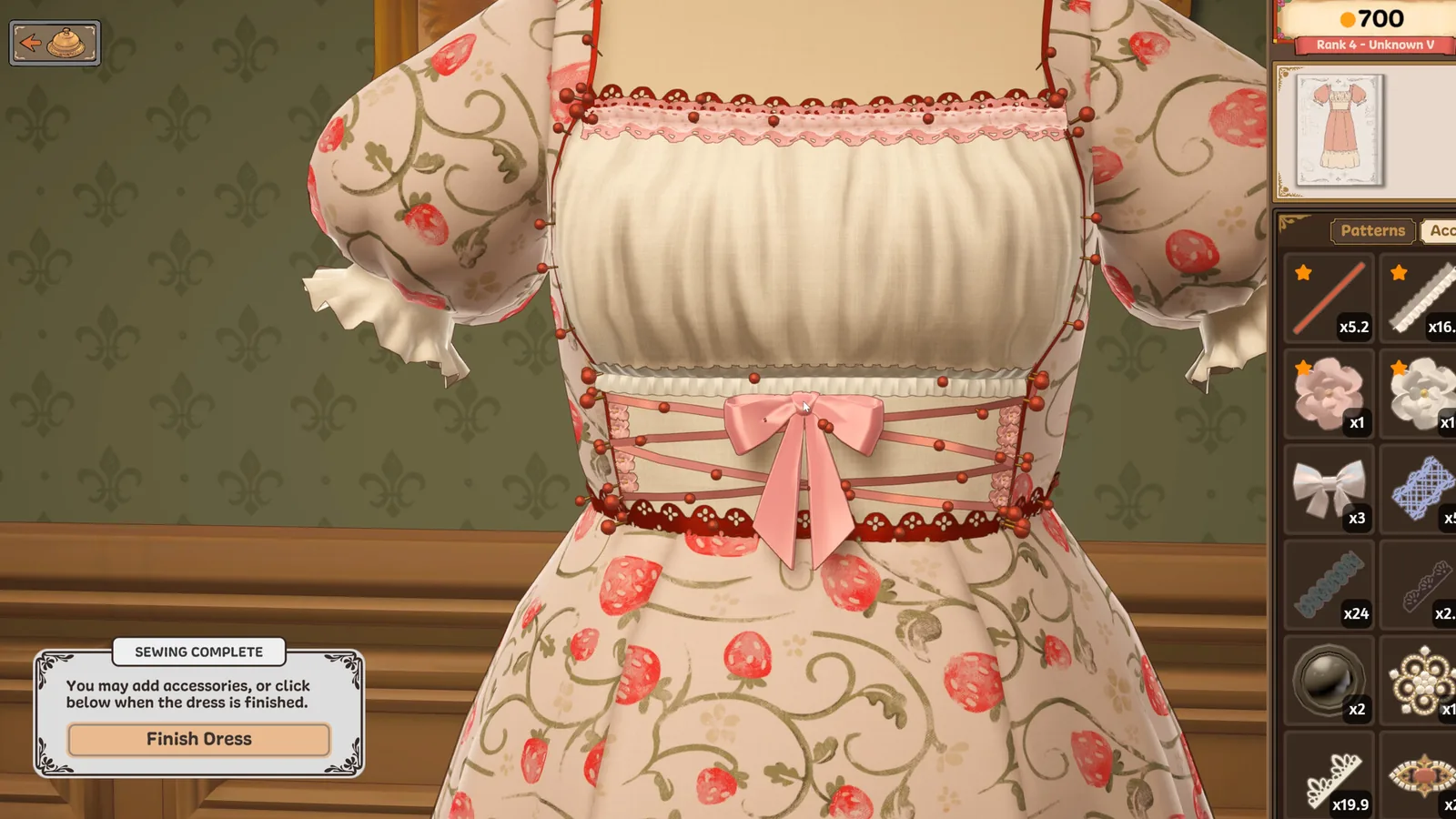
Trim in Dressmaker is not a sticker you click once. It is a line of pins you draw across the dress, and the way you draw it sets how it faces. Lace that comes out upside down is not a bug: draw the line from the other end and the top edge flips. Trim that floats above the fabric is fixed with Lower trim or a small Tilt, not by re-placing it. Everything else here is the mechanics the game does not spell out.
- Trim, Lace Trim, Bows, Flowers, Buttons and six more types share one Accessories tab
- Click for the first pin, click or Space for each next pin, right-click to finish the line
- A pin can sit at most 12.5 cm from the one before it, and each line uses real metres from your stock
- Right-click on a placed accessory takes it off and returns it; right-click on a line removes only the first or last pin
- Click a line and press the cross on its panel to remove the whole thing
- Draw direction decides which edge of the lace is on top
The eleven accessory types
The Emporium stocks 335 accessories in total, and every one belongs to one of eleven types. The type is what a card checks when it says "Trim: at least 3" or "Use 100cm of Lace Trim".
| Type | In the game | What a card asks for |
|---|---|---|
| Trim | 123 | Generic trim lines and counts |
| Bow | 57 | Bow counts, Cute and Playful tags |
| Lace Trim | 49 | "Use X cm of Lace Trim", measured along the line |
| Flower | 31 | "Flower: at least 3", counted one by one |
| Button | 25 | Button counts, Professional tags |
| Appliqué | 12 | Decorative panels and motifs |
| Brooch | 12 | Brooch counts, the money trick |
| Feather | 9 | Glamour and Elaborate |
| Jewel | 7 | Eveningwear and Glamour |
| Tassel | 6 | Trim-adjacent, counted as its own type |
| Bell | 4 | Trim-adjacent, counted as its own type |
Lace Trim is its own accessory type, and it is not the same as Lace fabric. A card that says "Use 100cm of Lace Trim" measures the pins you draw; a card that says "Lace: at least 40%" wants lace fabric covering that share of the dress, and trim does not count for it at all. The lace trim guide covers the requirement side in depth.
Placing a line of trim, step by step
- Open the Accessories tab. Trim only places while that tab is open, and only onto pieces already on the mannequin.
- Pick the trim. Your stock in metres shows next to the name.
- Click the dress for the first pin. A line needs at least two pins before it exists.
- Click again for each next pin, or press Space. The label shows the running length and how many metres you have left.
- Right-click to finish the line. A drag turns the mannequin instead of dropping a pin, so drag to reposition the view, then keep clicking.
- Click the finished line to get its panel: Raise trim, Lower trim, Tilt up, Tilt down, Increase size, Decrease size, Duplicate, Remove item.
Turn on Fast Trim Placement in the settings and pins drop automatically as you sweep the pointer along the dress; moving back lifts the last ones again. It is much faster for long hems and much worse for fiddly collars, so switch it per job.
Each pin can be at most 12.5 cm from the previous pin, so a long edge takes a lot of clicks. Players routinely zoom in and lay lace in short runs, rolling the wheel to turn the dress between them.
Trim that comes out upside down
The direction you draw decides which edge sits on top. Draw left to right and the lace faces one way; draw right to left and it flips. That is why the same bolt looks correct on one sleeve and wrong on the other.
| Symptom | Cause | Fix |
|---|---|---|
| Lace or bell hangs upside down | Line was drawn from the other end | Remove the line and redraw it in the opposite direction |
| Trim floats above the fabric | It sits slightly proud by default | Lower trim until it lies on the fabric |
| Trim is buried or clipping | Lowered too far | Raise trim |
| Lace stands away from the bust | Default tilt | Tilt up, increase size, then tilt down to settle it |
| Cuff trim runs under the sleeve | Sleeve placed first | Lay that trim first, then put the sleeve on |
| A tassel or bell will not hang straight | Gravity direction is set at placement | Duplicate the line and redraw the pin order |
Neither the upside-down lace nor the floating trim is a defect the developers have acknowledged; both are consequences of the pin system, which is why the fix is always in the pins rather than in a menu toggle.
Right-click removes the first or last pin only. To take the whole line off, click it once and press the cross on its panel. Once a line is down to one pin, the last pin returns to your stock by itself.
Resizing, copying and the rotation gizmo
A selected accessory gets a button panel. Increase and Decrease size work from 0.1 to 3 times the original, Raise and Lower change its height off the fabric, and Reset position undoes rotation and height but keeps the size. Duplicate hands you an identical copy to place.
The Accessory Rotation Gizmo is off by default. Turn it on in the pause menu or press left Ctrl and R with the Accessories tab open, and a selected accessory gains three rings and four arrows. Drag a ring to spin it, hold Shift while dragging to snap in 15 degree steps, and hold left Ctrl to align the rings to the accessory instead of the dress. Lace and trim lines do not get the gizmo, because their orientation comes from the pins.
How trim counts toward a score
Trim is not a flat bonus. Every accessory you place adds 1 Elaborate, and accessories that share a tag add less and less: the strongest counts in full, the next at 85%, the one after at 72%, and so on until a huge pile adds up to less than 6.7 times the strongest single piece. Lace and trim count their tags once per metre of line, and part of a metre adds part.
| Rule | Effect |
|---|---|
| Size | Makes no difference. A tiny bow and an oversized one add the same tags |
| Line length | Counts per metre, so a 2 m lace line adds twice what 1 m adds |
| Elaborate | +1 per accessory placed, which can break a Max line on Elaborate |
| Stacking | Shared tags decay 100%, 85%, 72%, so variety beats repetition |
| Accessory count line | Counts each accessory once, and a whole trim line counts as one |
A "Different accessories" line counts distinct items: two identical bows count once. On a beaded trim, each bead of that type counts separately, which makes beaded stock unusually valuable for count-based cards. The quality guide shows how these points combine with fabric and patterns.
Requirements that catch people out
Two lines look alike and behave differently.
- "Use 100cm of Lace Trim" adds up the length of your Lace Trim lines. It is 1 metre, not 100 metres.
- "Lace: at least 40%" wants lace fabric over 40% of the dress area. Trim contributes nothing.
- "Flowers: 60" is a tag score that fabric, patterns and accessories all feed.
- "Flower: at least 3" counts flower accessories one at a time, and no fabric helps.
If a lace line reads zero while trim is clearly on the dress, check the type in the accessory panel. Lace Trim, Trim and fabric lace are three separate things, and the card only accepts one of them.
The 50 metre trim achievement
Trim and Proper, the rarest achievement in the game at about 1.6% of players, needs more than 50 metres of trim on a single dress. It is a length total, not a piece count, so one very long lace strand drawn in passes is the efficient route. The achievements guide has the full list and the current completion rates.
FAQ
How do I remove trim in Dressmaker?
Click the line to select it, then press the cross on its panel to remove the whole line. Right-click only removes the first or last pin of the line. For a single accessory, right-click it and it returns to your stock.
Why is my lace upside down?
The direction you draw the pins sets which edge is on top. Remove the line and redraw it from the opposite end. Bells and tassels behave the same way.
Why does my trim float above the dress?
It sits a little proud of the fabric at the default height. Select the line and press Lower trim until it lies flat. If it still will not settle, tilt it rather than lowering further.
Does trim have to be placed on a finished dress?
It has to go onto pieces that are already on the mannequin, but the dress does not need to be sewn. Trim placed before sewing stays where it was put.
Does a bigger accessory score more?
No. Size changes only the look. The tags added are the same at 0.1x and at 3x.
Why does the trim counter not increase my score bar?
Either the card wants a different type (Lace Trim versus fabric Lace), or the shared-tag decay has flattened the gain. Check the requirement line wording before buying more of the same trim.
Related Guides
- Dressmaker lace trim requirements covers the centimetre lines and the 50 m marathon.
- Dressmaker quality and scoring explains the tag stack that trim feeds into.
- Dressmaker fabric list is the cloth-side counterpart to this page.
- Dressmaker achievements lists Trim and Proper among the craft milestones.
Sources: community guide to placing, rotating and removing accessories, Dressmaker on Steam, player reports on trim direction in the Steam discussion board, and the October Build 443 notes on the accessory UX.